
Key points
- Use one code per day: P present, A absent, HD half day, L paid leave, WO weekly off, H holiday.
- Paid days = present + half of half days + paid leave + weekly offs + holidays.
- Loss of pay (LOP) days = days in the month − paid days.
- Keep overtime hours in their own column: overtime is paid at twice the normal rate and needs the worker's consent.
Key facts (as of 17 November 2026)
- The four Labour Codes apply from 21 November 2025 (PIB).
- Working hours: 8 to 12 hours a day and 48 hours a week, depending on the rules for the kind of work (PIB).
- Overtime: only with the worker's consent, at no less than twice the normal rate of wages (PIB).
- We found no single government Excel format; state rules set the statutory register forms.
Updated 17 November 2026.
What is an attendance register?
An attendance register is the month's record of each employee's working days: one row per person, one column per date, with a mark for present, absent, half day, leave, weekly off or holiday. Its totals give paid days and loss-of-pay days, which the salary register uses to work out each person's earned pay.
This page gives a working Excel layout. The statutory register forms you must keep come from the labour rules of your state, so check those before you treat any sheet as the legal register.
Which codes should an attendance sheet use?
Six codes cover most workplaces: P for present, A for absent, HD for half day, L for paid leave, WO for weekly off and H for a paid holiday. Use one code per cell, always in capitals and with no spaces, so that COUNTIF counts every day correctly and no day is counted twice.
| Code | Meaning | Counts as |
|---|---|---|
| P | Present | 1 paid day |
| HD | Half day | 0.5 paid day, 0.5 LOP |
| L | Paid leave (CL, SL, EL) | 1 paid day |
| WO | Weekly off | 1 paid day |
| H | Paid holiday | 1 paid day |
| A | Absent or unpaid leave | 1 LOP day |
If you need to tell leave types apart, keep separate columns for CL, SL and EL balances, but mark the day itself as L so the paid-day formula stays simple.
How do you lay out the sheet in Excel?
Put the month's first date in cell A1 and the headings in row 2. Columns A and B hold the employee code and name, columns C to AG hold days 1 to 31, and columns AH onwards hold the totals. The first employee goes in row 3; copy the formulas down for everyone else.
| Column | Heading | Formula (row 3) |
|---|---|---|
| A | Employee code | Typed |
| B | Name | Typed |
| C to AG | Day 1 to day 31 | One code a day; leave the extra days of a short month blank |
| AH | Present | =COUNTIF(C3:AG3,"P") |
| AI | Half days | =COUNTIF(C3:AG3,"HD") |
| AJ | Paid leave | =COUNTIF(C3:AG3,"L") |
| AK | Weekly offs | =COUNTIF(C3:AG3,"WO") |
| AL | Holidays | =COUNTIF(C3:AG3,"H") |
| AM | Absent | =COUNTIF(C3:AG3,"A") |
| AN | Paid days | =AH3+AI3*0.5+AJ3+AK3+AL3 |
| AO | Days in month | =DAY(EOMONTH($A$1,0)) |
| AP | LOP days | =AO3-AN3 |
| AQ | Overtime hours | Typed from the overtime record |
| AR | Check | =IF(COUNTA(C3:AG3)=AO3,"OK","Fill every day") |
The check column catches a row where a day was left empty or a code was typed twice. Add conditional formatting on C3:AG3 (for example, red when the cell equals "A") so absences stand out.
How do you calculate paid days from attendance?
Paid days are present days plus half of each half day plus paid leave, weekly offs and paid holidays: =AH3+AI3*0.5+AJ3+AK3+AL3. Loss-of-pay days are the days in the month minus paid days. Earned pay for each salary item is then fixed pay × paid days ÷ days in the month.
Some employers pay on a fixed 26-day or 30-day month instead of the calendar days. Whatever you choose, use the same divisor every month and in the salary register, so the two sheets agree.
Worked example: a 30-day month
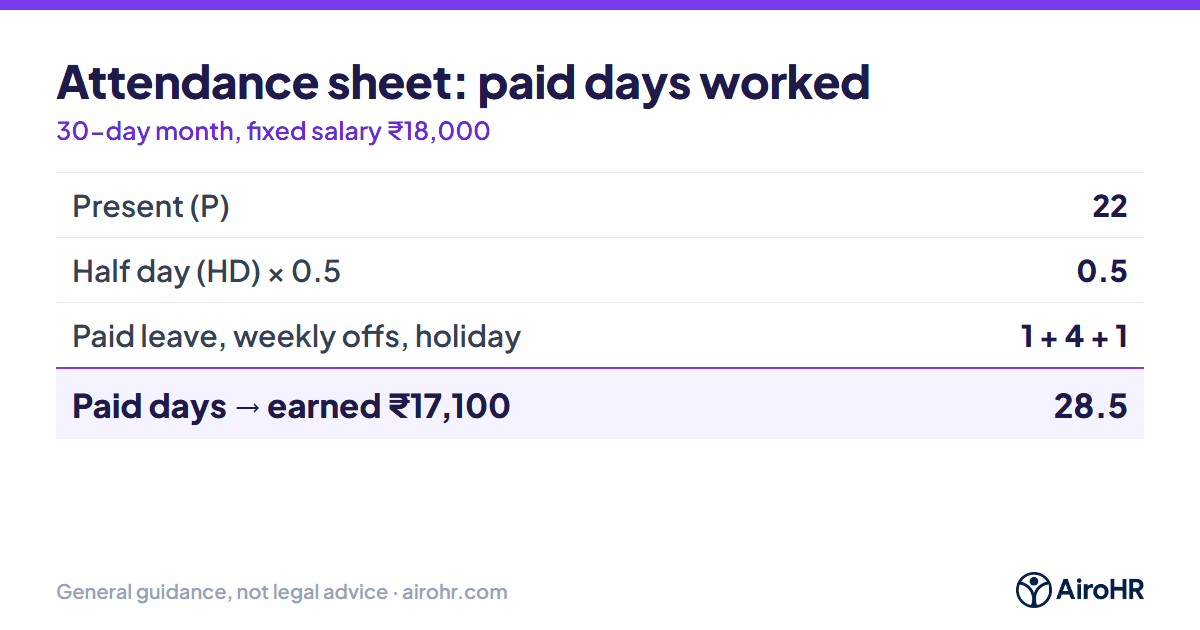
An employee on a fixed monthly salary of ₹18,000 has this month: 22 days P, 1 HD, 1 L, 4 WO, 1 H and 1 A, which makes 30 days in all.
| Item | Working | Result |
|---|---|---|
| Paid days | 22 + 1 × 0.5 + 1 + 4 + 1 | 28.5 |
| LOP days | 30 − 28.5 | 1.5 |
| Earned salary | 18,000 × 28.5 ÷ 30 | ₹17,100 |
| Salary cut for LOP | 18,000 − 17,100 | ₹900 |
PF, ESI and professional tax are then worked out on the earned amounts, as shown in the salary register format.
How should overtime be recorded on an attendance sheet?
Keep overtime hours in a separate column, not as extra days. Under the Labour Codes, overtime needs the worker's consent and is paid at no less than twice the normal rate of wages, so you need the hours, not days, to work out the payment. Record the date and hours of each overtime spell as well.
The overtime calculation guide shows how to turn monthly wages into an hourly rate and price the overtime hours.
What goes wrong with attendance sheets in Excel?
- Codes are typed in different ways ("p", "P ", "Present"), so COUNTIF misses some days.
- Weekly offs and holidays are left blank instead of coded, so paid days come out short.
- Late marks, short hours and night shifts are decided by eye, differently each month.
- The sheet is filled from memory at month end instead of from the punch record.
- Leave taken is marked on the sheet but never deducted from the leave balance.
Attendance in AiroHR
AiroHR builds each day's attendance from biometric machines and selfie and GPS punches in the staff app, applies your shift, late and overtime rules, and passes paid days straight to payroll. The monthly attendance page downloads to Excel when you need the sheet.
Attendance software Salary register formatWhere to confirm
- Press Information Bureau: Labour Codes — working hours and overtime under the Labour Codes.
- Ministry of Labour and Employment — the Labour Codes and the rules made under them.
Commentary this guide was written from
Work it out, then stay up to date
Use the free salary slip generator, or get each month's PF, ESI, PT and TDS dates by email with free compliance alerts.
Related guides
The formulas on this page are a working layout, not a statutory form. Check the register forms your state requires and the leave, holiday and overtime rules that apply to your staff. Last reviewed: 17 November 2026.