
Key points
- Keep one row per employee per month: fixed pay, paid days, earned pay, deductions, net pay and employer cost.
- Earned pay = fixed pay × paid days ÷ days in the month.
- PF is 12% of PF wages, on wages up to ₹25,000 where you restrict to the ceiling (from 17 September 2026).
- ESI is 0.75% (employee) and 3.25% (employer) of gross wages, for employees on ₹21,000 a month or less.
Key facts (as of 14 November 2026)
- EPF wage ceiling: ₹25,000 a month from 17 September 2026, S.O. 5109(E) (EPFO).
- PF: 12% employee, 12% employer; 8.33% of the employer share goes to EPS, so EPS is at most ₹2,083 a month (EPFO).
- ESI: 0.75% employee, 3.25% employer, for gross wages up to ₹21,000 a month (ESIC).
- We found no single government Excel format; state labour rules set the statutory register forms.
Updated 14 November 2026.
What is a salary register?
A salary register is the month's payroll sheet: one row per employee showing fixed pay, days paid, earned pay, each deduction (PF, ESI, professional tax, TDS, advances), net pay and the employer's PF and ESI. It is the base for payslips, bank transfers and the PF and ESI returns.
This page gives a working Excel layout. The statutory register forms you must keep come from the labour rules of your state, so check those before you treat any sheet as the legal register.
Which columns should a salary register have?
Employee code, name, UAN and ESI number, days in month, paid days, fixed Basic, HRA and other allowances, earned amounts of each, gross earned, PF wages, employee PF, employee ESI, professional tax, TDS, other deductions, net pay, then the employer's EPS, EPF, EDLI and ESI.
| Column | Heading | What goes in |
|---|---|---|
| A | Employee code | Your code for the employee. |
| B | Name | As on the bank account and UAN. |
| C | Days in month | 30, 31, 28 or 29 (or your fixed divisor). |
| D | Paid days | Present days plus paid leave, holidays and weekly offs. |
| E | Basic (fixed) | Monthly Basic, plus DA if you pay it. |
| F | HRA (fixed) | Monthly HRA. |
| G | Other allowances (fixed) | All other monthly allowances. |
| H | Fixed gross | =SUM(E2:G2) |
| I | Earned Basic | =ROUND(E2*D2/C2,0) |
| J | Earned HRA | =ROUND(F2*D2/C2,0) |
| K | Earned other | =ROUND(G2*D2/C2,0) |
| L | Gross earned | =SUM(I2:K2) |
| M | Employee PF | =ROUND(MIN(I2,25000)*12%,0) |
| N | Employee ESI | =IF(H2<=21000,ROUNDUP(ROUND(L2*0.75%,2),0),0) |
| O | Professional tax | From your state's slab. |
| P | TDS | From the employee's tax working. |
| Q | Advance / other | Recoveries for the month. |
| R | Net pay | =L2-SUM(M2:Q2) |
| S | Employer EPS | =ROUND(MIN(I2,25000)*8.33%,0) |
| T | Employer EPF | =ROUND(MIN(I2,25000)*12%,0)-S2 |
| U | Employer EDLI | =ROUND(MIN(I2,25000)*0.5%,0) |
| V | Employer ESI | =IF(H2<=21000,ROUNDUP(ROUND(L2*3.25%,2),0),0) |
Put the headings in row 1 and the first employee in row 2, then copy the formulas down. The ROUND(...,2) inside the ESI formulas stops Excel's floating point from rounding an exact amount up by a rupee.
How do you calculate PF in Excel?
Multiply PF wages (earned Basic plus DA) by 12%. If you restrict PF to the statutory ceiling, cap the wages at ₹25,000 first: =ROUND(MIN(I2,25000)*12%,0). The employer also pays 12%: 8.33% of capped wages to EPS, the balance to EPF, plus EDLI at 0.5%.
Drop the MIN(...,25000) if you pay PF on full wages, and set EPS to zero for members who are not in the pension scheme. The EPF wage ceiling guide explains the September 2026 change and who is newly covered.
How do you calculate ESI in Excel?
If fixed monthly gross is ₹21,000 or less, multiply the month's earned gross by 0.75% for the employee and 3.25% for the employer, and round each up to the next rupee: =IF(H2<=21000,ROUNDUP(ROUND(L2*0.75%,2),0),0). Otherwise put zero.
A simple formula cannot follow ESI's contribution periods: an employee who was covered on 1 April or 1 October stays covered until that period ends, even after an increment above ₹21,000. Override those rows by hand. The ESI calculation guide has the rules.
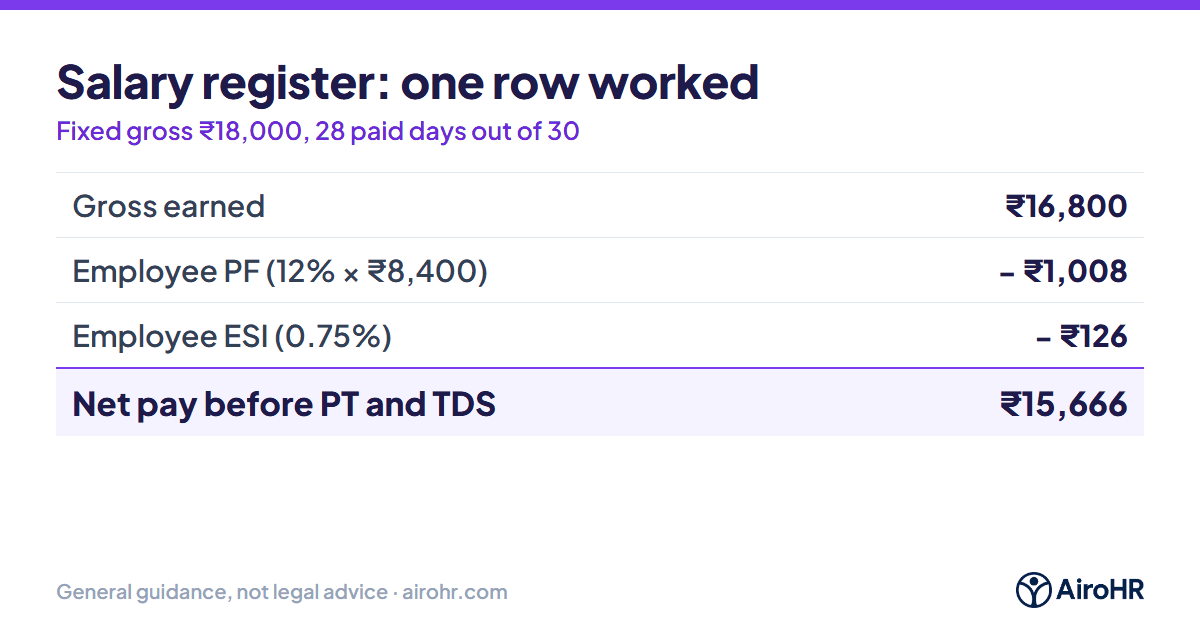
Worked example: ₹18,000 gross, 28 paid days out of 30
Fixed pay: Basic ₹9,000, HRA ₹3,600, other allowances ₹5,400 (fixed gross ₹18,000). The employee has 28 paid days in a 30-day month. Professional tax and TDS are left out because they depend on the state and the employee.
| Item | Working | Amount |
|---|---|---|
| Earned Basic | 9,000 × 28 ÷ 30 | ₹8,400 |
| Earned HRA | 3,600 × 28 ÷ 30 | ₹3,360 |
| Earned other | 5,400 × 28 ÷ 30 | ₹5,040 |
| Gross earned | 8,400 + 3,360 + 5,040 | ₹16,800 |
| Employee PF | 12% × 8,400 | ₹1,008 |
| Employee ESI | 0.75% × 16,800 | ₹126 |
| Net pay (before PT and TDS) | 16,800 − 1,008 − 126 | ₹15,666 |
| Employer EPS | 8.33% × 8,400 | ₹700 |
| Employer EPF | 1,008 − 700 | ₹308 |
| Employer EDLI | 0.5% × 8,400 | ₹42 |
| Employer ESI | 3.25% × 16,800 | ₹546 |
How do you add professional tax to the register?
Professional tax is a state tax with its own slabs, so there is no single formula. Look up the employee's monthly salary in your state's slab and enter the amount in the PT column, or use a lookup table on a second sheet. Some states charge a different amount in one month of the year.
See the Karnataka and Maharashtra professional tax guides.
What goes wrong with salary registers in Excel?
- A formula is typed over with a number in one row and never noticed.
- Paid days are copied from last month instead of this month's attendance.
- ESI stops in the month of an increment instead of at the end of the contribution period.
- A new joiner or a leaver's row is missed, so the bank file and the PF return disagree.
- Old months are overwritten, so there is no record of what was paid.
Salary register in AiroHR
AiroHR builds the register from attendance each month: paid days, earned pay, PF, ESI, professional tax and net pay for every employee, with payslips and the PF ECR file from the same run. You can download the register to Excel.
Payroll software Salary slip formatWhere to confirm
- EPFO — the PF wage ceiling and contribution rates.
- ESIC: contribution — ESI rates and the wage limit.
- Ministry of Labour and Employment — the Labour Codes and the wage definition.
Commentary this guide was written from
Work it out, then stay up to date
Use the free pf calculator, or get each month's PF, ESI, PT and TDS dates by email with free compliance alerts.
Related guides
The formulas on this page are a working layout, not a statutory form. Check the register forms your state requires and the PF and ESI rules that apply to each employee. Last reviewed: 14 November 2026.